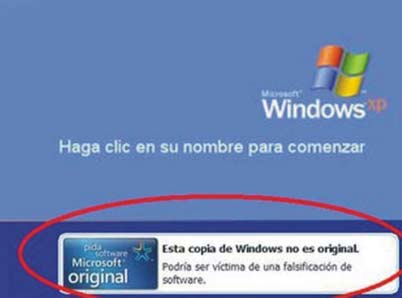
Aca les dejo las instrucciones para quitar ese maldito icono de no es windows original
me costo encontrarlo asi que posteen :-)
Hay muchas maneras de eliminar esta MOLESTA ACTUALIZACION DE WINDOWS XP, generalmente todas requieren iniciar el PC en SAFE MODE, pero lo que les dejo yo aqui es la misma forma pero sin tener que arrancar el ordenador en ese modo, sino en modo normal:
1) Abres el block de notas(INICIO/PROGRAMAS/ACCESORIOS/BLOCK DE NOTAS).
2)Escribes lo siguiente (copia y pega esto):
taskkill /im wgatray.exe
Del c:\Windows\System32\WgaTray.exe
Del c:\Windows\System32\dllcache\WgaTray.exe
echo Windows Registry Editor Version 5.00 >%temp%\WGANFIX.REG
echo. >>%temp%\WGANFIX.REG
echo [-HKEY_LOCAL_MACHINE\SOFTWARE\Microsoft\Windows NT\CurrentVersion\Winlogon\Notify\WgaLogon] >>%temp%\WGANFIX.REG
regedit /s %temp%\WGANFIX.REG
del %temp%\WGANFIX.REG
del c:windows\system32\wgalogon.dll
del c:windows\system32\dllcache\wgalogon.dll
3) Pones archivo guardar como y lo guardas con el nombre de: WGANFIX.CMD.
en el directorio WINDOWS/SYSTEM32/PREFERENTEMENTE AL ULTIMO DE ESTA CARPETA.
4) UNA VEZ GUARDADO LO BUSCAS Y LE HACES DOBLE CLICK SE EJECUTARA SOLO, REINICIAS EL ORDENADOR Y VERAZ EL RESULTADO, SI NO PSA NADA APAGA LA MAQUINA Y PRENDELA DE NUEVO.
MUCHAS GRACIAS POR LA ATENCION Y ESPERO QUE LES SIRVA.


 sino ven la imagen = aqui


 Entradas

